ONE PLATFORM. INTELLIGENT AI. SUCCESSFUL SCHOOLS.
Discover how Graphite Education and GE 2.0 connect school operations with a modern user experience and built-in Intelligent AI. Find answers about admissions, academics, business operations, family engagement, reporting, automation, security, and Geni—Graphite’s AI assistant.
About Graphite Education
What is Graphite Education?
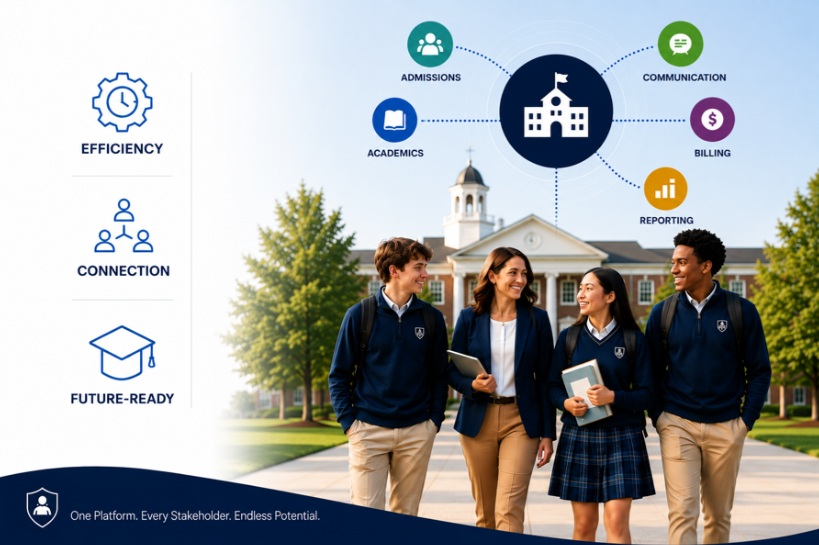
Graphite Education is a modern, cloud-based Student Information System (SIS) that brings school operations, people, processes, and data together in one comprehensive platform. With GE 2.0, Graphite introduces a refreshed user experience and expanded Intelligent AI capabilities to help schools simplify everyday tasks, analyze information, automate supported workflows, and make informed decisions. From admissions and academics to billing, reporting, and family engagement, Graphite supports the work of Successful Schools.
Who is Graphite Education designed for?
Graphite Education is designed for independent, private, and faith-based schools seeking one comprehensive, intelligent platform to manage school operations, streamline workflows, and enhance engagement across their school communities.
How long has Graphite Education served schools?
Graphite Education brings more than 30 years of experience in education technology. The platform reflects decades of work with schools and multiple generations of school-management software.
Is Graphite Education cloud-based?
Yes. Authorized users can access Graphite through a supported web browser without installing on-premises software. Administrators, faculty, students, and families can access information and tools appropriate to their roles.
What makes Graphite different from a traditional SIS?
Graphite combines comprehensive school operations with built-in Intelligent AI. With GE 2.0, authorized users can ask questions about their data, create charts and dashboards, identify trends, and complete supported tasks using natural-language prompts. Rather than relying on disconnected systems and manually compiling information, schools can work from one comprehensive platform designed for smarter operations and better decisions.
What’s New in GE 2.0?
What is GE 2.0?
GE 2.0 is Graphite Education’s latest platform evolution, introducing a refreshed interface, improved navigation, and expanded Intelligent AI capabilities. It makes it easier to find information, analyze school data, simplify routine tasks, and act on insights within one connected system.
What’s new in the GE 2.0 user experience?
GE 2.0 features a customizable homepage with Favorites, Recently Visited Pages, and Quick Tasks. Users can personalize their homepage, filter information by portal, quickly access frequently used tools, and navigate through a refreshed interface.
What is Search Everything?
Search Everything helps users locate information, pages, and tasks across Graphite without navigating through multiple menus. Users can also access Geni to ask questions about school data in natural language.
What are Student Signals and Admissions Signals?
Student Signals brings together attendance, grades, assignments, behavior, and portal activity to help school teams identify students who may need attention. Admissions Signals highlights stalled applications, incomplete requirements, enrollment trends, and families who may need follow-up. Both help authorized users recognize patterns and prioritize timely action.
Can Geni take action based on user requests?
Yes. With Do It For Me, authorized users can give supported voice or text instructions to perform tasks such as adding log records or entering attendance. Depending on the workflow and permissions, Geni can also help prepare communications and take other supported actions.
Can Geni help improve school communications?
Yes. Graphite’s Email Polish and Beautify features help users refine messages for clarity, professionalism, and consistency while incorporating school branding to create polished, visually appealing communications. This simplifies the creation of branded emails and reduces time spent drafting, formatting, and editing.
Geni and Intelligent AI
What is Geni?
Geni is Graphite’s built-in Intelligent AI assistant. It helps authorized users ask questions in everyday language, analyze information, create charts and dashboards, simplify routine work, and complete supported tasks within Graphite.
How can Geni help school administrators?
Geni helps staff find information, identify trends, summarize results, create visual analyses and reports, and work more efficiently. For example, an administrator could ask how many students have chronic absences or which families have outstanding tuition balances, subject to the user’s permissions.
How can Geni reduce administrative workload?
Geni reduces the need to navigate multiple screens or manually compile information in spreadsheets. Natural-language analysis, scheduled queries, dashboards, and supported text- or voice-driven tasks help staff spend less time on repetitive work.
Does Geni replace decisions made by school leaders?
No. Geni supports human judgment by making relevant information easier to find and understand. School leaders remain responsible for interpreting context and making decisions.
How is school information protected when Geni is used?
Geni operates within Graphite’s protected environment and follows established access permissions. Users can access only information authorized for their roles. Graphite does not use school data to train AI models.
Intelligent AI Signals and Reporting
How can Graphite help identify students who need additional support?
Student Signals helps authorized school teams review patterns across attendance, grades, assignments, behavior, and portal activity. Seeing these indicators together can help teams recognize students who may benefit from timely outreach or support.
Can Graphite help schools identify enrollment risks?
Admissions Signals helps admissions teams spot stalled applications, incomplete requirements, changing enrollment trends, and prospective families who may need attention, supporting more timely follow-up.
Can Geni create charts, reports and dashboards?
Yes. Users can ask questions about school data in everyday language and view results in tables or charts. They can use results to create dashboards and schedule queries to monitor key information over time.
Can leaders analyze data without manually building reports?
Yes. Geni’s natural-language analysis lets authorized users ask questions such as “How many students are failing math?” or “Which accounts have tuition due?” and explore the resulting information without starting from a manual export.
How does Graphite help administrators make faster decisions?
Graphite connects information across school operations, while Geni and Signals dashboards help surface trends and areas needing attention. Leaders can spend less time gathering information and more time evaluating priorities and taking appropriate action.
Platform and Modules
What solutions are available in Graphite Education?
Graphite offers solutions for Academics, Business Office, Admissions, Learning Management Systems, Health, Transportation, Gradebook, Meals, Parent-Teacher Conferences, Programs, and the Parent Portal. The platform also includes workflow automation, reporting, a customizable user experience, and built-in Intelligent AI.
Can Graphite replace multiple disconnected systems?
Yes. Graphite brings core school functions—including admissions, academics, business operations, communications, and family engagement—into one platform. Schools can reduce the need to maintain multiple separate systems, minimize duplicate data entry, and give authorized users a more consistent experience across departments.
Academics and Gradebook
What academic management tools are available?
Graphite connects scheduling, enrollment, attendance, academic records, communications, progress monitoring, and reporting. Schools can configure academic processes to reflect their programs, policies, and reporting requirements.
Can teachers take attendance online?
Yes. Teachers can record attendance in Graphite, and schools can configure attendance rules and notifications. With GE 2.0, supported attendance entry can also be completed through Geni using voice or text prompts.
What is included in Gradebook?
Gradebook helps teachers create and manage assignments, record marks, calculate grades, and share approved information with students and families. It connects with scheduling, reporting and the Parent Portal to reduce duplicate work and improve visibility.
Can schools configure grading rules?
Yes. Schools can configure grading scales, weighting, assignment categories and reporting rules to support their academic policies.
Can families view grades and assignments?
Yes. Schools control when grades, assignments, progress information and report cards become available through the Parent Portal.
Admissions and Enrollment
How does Graphite support admissions?
Graphite supports the journey from inquiry through application, decision and enrollment. Teams can manage prospective-family information, applications, interviews, tasks, communications, and pipeline activity in one connected environment.
Can schools create their own application forms?
Yes. Schools can configure application and admissions forms to reflect different grades, programs and stages of the admissions process.
Can admissions communications be automated?
Yes. Admissions teams can create communications and workflow steps that help families receive timely information and help staff follow up consistently. This reduces repetitive administrative work while preserving a personal admissions experience.
What visibility does the admissions team have?
Authorized users can monitor applicants through reports and dashboards. With GE 2.0, Admissions Signals adds visibility into stalled applications, incomplete requirements, enrollment trends, and families who may need follow-up.
Business Office
Can Graphite manage tuition, billing and payments?
Graphite's Business Office solution connects tuition agreements, charges, payment activity, and family account information. It helps schools simplify financial workflows while giving families a clear, convenient payment experience.
Does Graphite support recurring payments?
Graphite supports scheduled and recurring payment workflows for applicable school charges. Families can view account information and make payments through the Parent Portal.
Can business-office teams report on financial activity?
Yes. Authorized users can access reports and account information to monitor balances, receivables, and payment activity. With Geni, users can also ask natural-language questions about relevant financial data, subject to their permissions.
Health, Transportation, Meals and Programs
What can the Health solution manage?
Graphite centralizes student health information such as emergency contacts, allergies, special conditions, immunization information, health documentation, nurse visits and medication records for authorized users.
Can schools monitor immunization requirements?
Yes. Graphite helps authorized staff maintain immunization information, identify missing or expiring records and communicate with families based on school and regulatory requirements.
How does connected health information support student safety?
Keeping current health and emergency information in a connected system helps authorized staff find critical details more quickly and respond with better context when a student needs care.
How does Graphite support transportation operations?
Graphite helps schools maintain transportation information, assign students to routes and stops, manage requests and communicate relevant details with families and staff.
Can families view transportation information?
Yes. Schools can make approved route, stop and schedule information available to families through the Parent Portal.
Can schools communicate transportation changes?
Graphite can help schools communicate route updates, delays and schedule changes to the appropriate audiences.
What does the Meals solution support?
Graphite helps schools manage meal offerings, family ordering, payments and operational reports. Schools can configure options and ordering periods to reflect the way their meal program operates.
Can families order and pay for meals online?
Yes. Families can place eligible meal orders and make payments through the Parent Portal, based on the school's configured program and ordering schedule.
How does Graphite support school programs?
Graphite Programs helps schools manage registration and related family workflows for applicable activities, services or school programs.
Can Graphite manage parent-teacher conference scheduling?
Yes. Graphite's Parent-Teacher Conference solution helps schools organize conference availability and gives families a convenient way to select eligible appointment times.
Parent and Student Experience
What can families do through the Parent Portal?
Depending on the school's configuration, families can review academic and attendance information, complete forms, register for programs, view financial activity, make payments, and access school communications through one portal.
Is Graphite mobile-friendly?
Yes. Graphite provides a responsive experience across supported desktop, tablet and mobile browsers. A native iOS and Android app is also coming soon, with convenient access to school information and supported voice-to-text workflows. Availability will be announced when the app launches.
Is Graphite easy to learn?
Graphite emphasizes a consistent, intuitive user experience across the platform. Familiar design patterns, configurable workspaces and connected workflows help users find what they need and complete common tasks with less friction. GE 2.0 adds a customizable homepage, improved navigation, Search Everything, and Geni assistance to make common tasks easier to find and complete.
Reporting, Integrations and External AI
What reporting capabilities are available?
Graphite provides configurable dashboards, ad hoc reporting, and report templates across school operations. Authorized users can filter, group, summarize, and organize information to answer routine questions and support decision-making. With GE 2.0, Geni also supports natural-language analyses, charts, dashboards, and scheduled queries, helping authorized users explore information without manually building every report.
Can users ask questions about data using everyday language?
Yes. Geni lets authorized users ask questions in natural language and view relevant data as answers, tables or charts, reducing reliance on manually created spreadsheets and one-off reports.
Does Graphite integrate with other school technology?
Yes. Graphite can connect with selected third-party systems to support a school’s broader technology environment. Flexible API connections allow Graphite to exchange information with other systems and accommodate a range of integration needs. Because every school’s technology ecosystem is different, specific integration and API requirements are reviewed during the evaluation and implementation process to determine the best approach.
Can schools access Graphite data through external AI assistants?
Graphite’s MCP Server allows authorized users to connect Graphite data with compatible external AI assistants, such as ChatGPT or Claude. Graphite permissions continue to govern access. External providers have their own privacy, security and AI training policies, which schools should review before connecting.
Does an integration eliminate duplicate data entry?
A well-designed integration can reduce duplicate data entry and help systems share consistent information. Results depend on the connected product, available data and direction of integration.
Implementation, Training and Support
What does implementation include?
Graphite partners with each school through planning, configuration, data preparation, testing, training, and launch. The implementation approach is shaped by the solutions selected, the school's existing systems and its operational priorities.
How is existing school data moved into Graphite?
The Graphite team works with the school to identify, prepare and validate the data needed for implementation. The migration plan depends on the source systems, data quality and agreed project scope.
How long does implementation take?
Implementation timing varies based on scope, data readiness, integrations, school availability and desired launch date. Graphite establishes a project plan and timeline with the school during the implementation process.
What training is available?
Schools receive training, documentation, and ongoing support resources designed to help administrators and staff prepare for launch and use Graphite effectively. Geni, Graphite’s built-in AI assistant, provides additional support by allowing authorized users to ask how-to questions in natural language, receive guidance on completing tasks, and explore related help topics. This gives users convenient access to answers and guidance as they work within the platform.
What support is available after launch?
Graphite provides ongoing, personalized support from a knowledgeable team that understands the platform and your school’s unique needs. When questions arise, schools can connect directly with our support team for guidance, problem-solving, and help getting the most value from Graphite.
Security, Data and Pricing
How does Graphite protect school and student information?
Graphite takes the security and privacy of school and student information seriously. The platform uses industry-standard security practices, safeguards, and access controls designed to protect information and ensure it is available only to authorized users. Graphite continually evaluates its security practices as technology, standards, and school needs evolve. Graphite’s built-in AI capabilities operate under established user permissions, and Graphite does not use school data to train AI models. When schools choose to connect external AI assistants, data handling also follows the selected provider’s privacy, security, and AI training policies.
What should schools know about external AI connections?
When a school connects a compatible external AI assistant through Graphite’s MCP Server, Graphite’s access permissions still apply. Data shared with an external provider is also subject to that provider’s privacy, security, and AI training policies. Schools should evaluate those policies before enabling a connection.
How is Graphite Education priced?
Pricing is based on the solutions and implementation requirements selected for the school. A Graphite specialist can learn about your needs and prepare a proposal aligned with your priorities.
Ready to Experience GE 2.0?
See how Graphite Education combines connected school operations with Intelligent AI to simplify workflows, uncover meaningful insights, and help your school make better decisions.
Why wait to make your school smarter? Discover what Graphite can do for your school. Book your personalized demo today!



.jpg)
.jpg)